
Create Interactive Maps
Visualize Company Data Perfectly
With the WebGIS WIGeoWeb, you can create interactive maps covering the whole world. This allows you to view your customers, locations, sales territories and key performance indicators on a map.
Key Facts at a Glance
Interactive maps are digital maps that enable businesses to visualize, analyze and evaluate data spatially. Data on locations, customers, sales territories, property, infrastructure or market potential integrated and explored directly within the browser.
With WIGeoWeb, you can create interactive maps without any specialist knowledge. Features such as search, filters, heatmaps and classification help you do this.
Typical areas of application include location analysis, sales territory planning, location analysis for real estate, expansion and market analysis. This enables companies to identify spatial relationships more quickly and make informed decisions based on their own and external data.
Create interactive maps with WIGeoWeb, Request a Free Trial Account
How Do Businesses Use Interactive Maps?
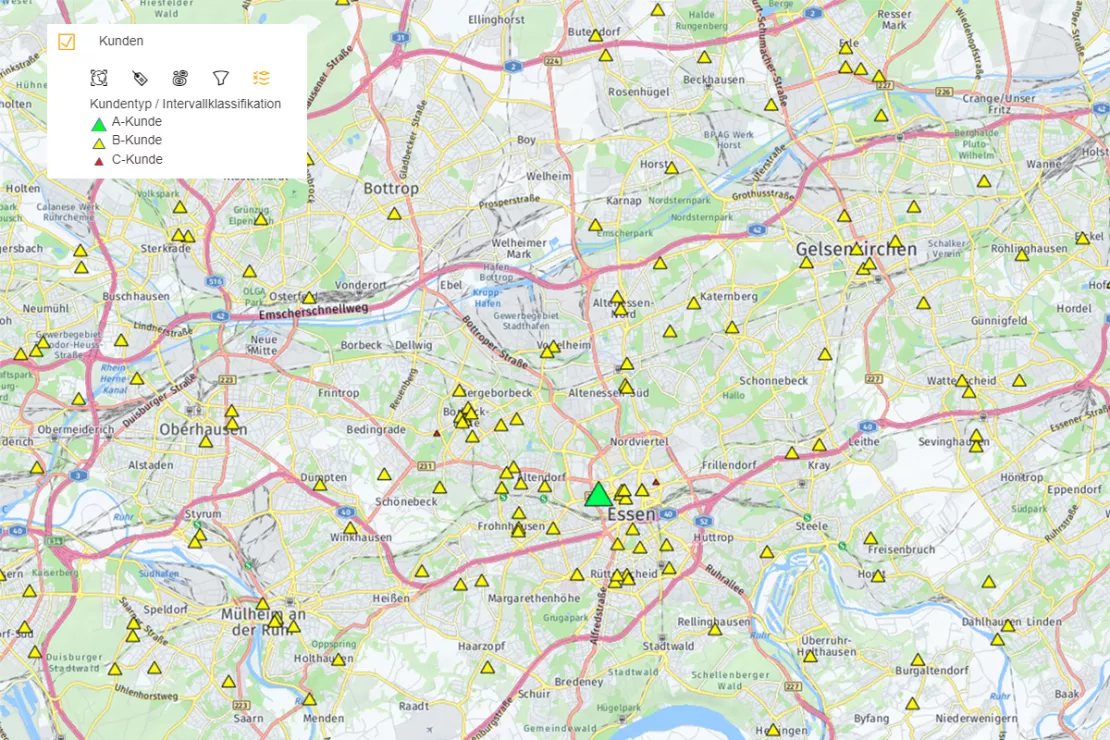
Customer data on the map
View all your customers – or specific customer segments, such as A, B and C customers – on an interactive map.
You can see their distribution and spread across the area. Each point represents a customer’s address (location/place of residence).
Locations on the map
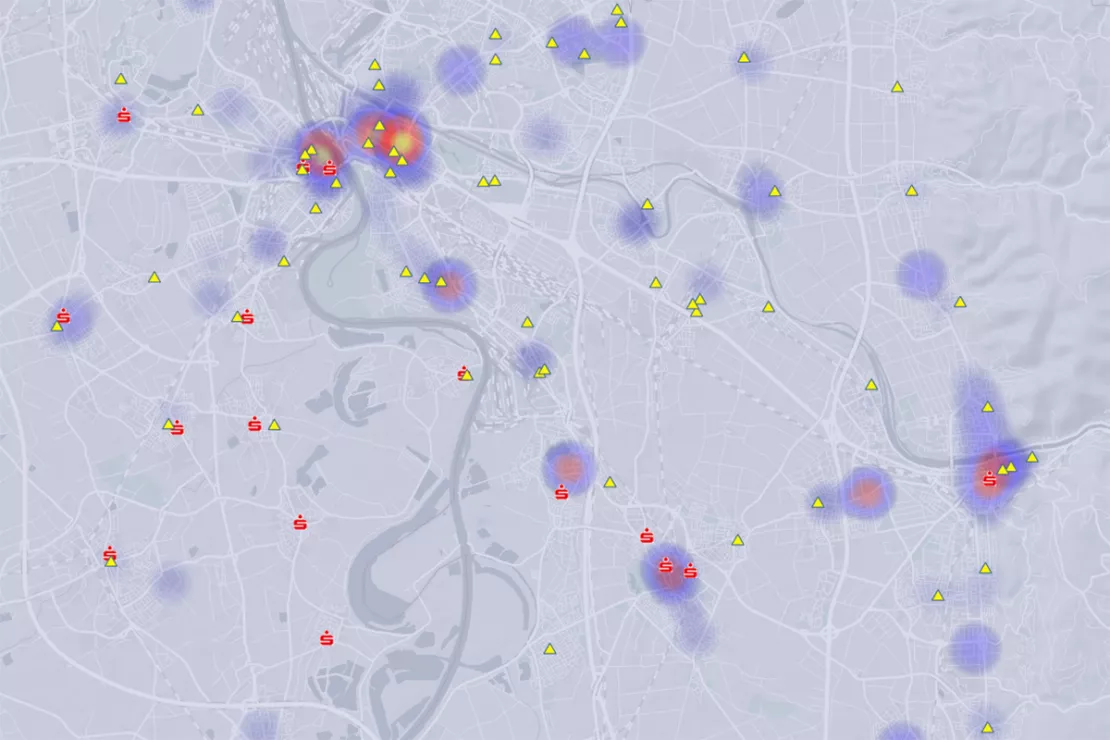
Display your company’s global locations on a map – alongside customer density:
- Branches
- Retailers
- Distribution partners
- Service centers
- Warehouses
- Logistics hubs, etc.
Revenue by Sales Territory
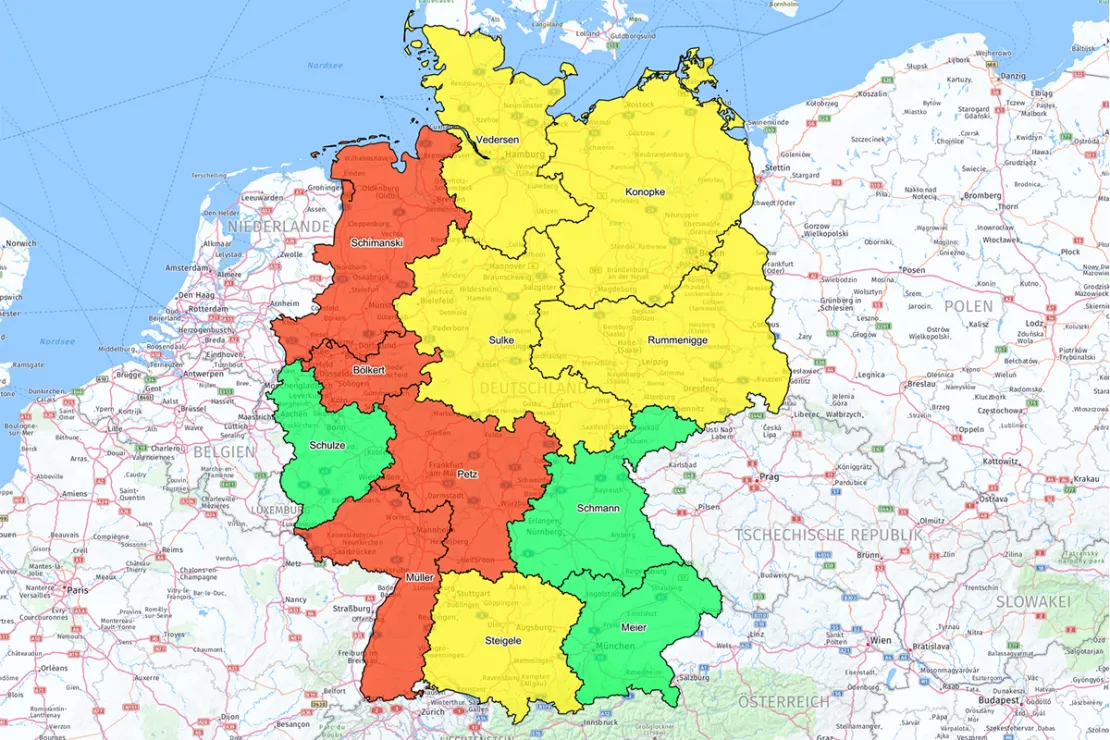
Gain valuable insights into your revenue performance. How is your business performing globally, across Europe or in specific regions?
View revenue figures by area of responsibility and drill down into the details. Analyze revenue by territory, business unit or product line – as well as any KPI you want to evaluate and visualize on an interactive map.
Competitors on the Map
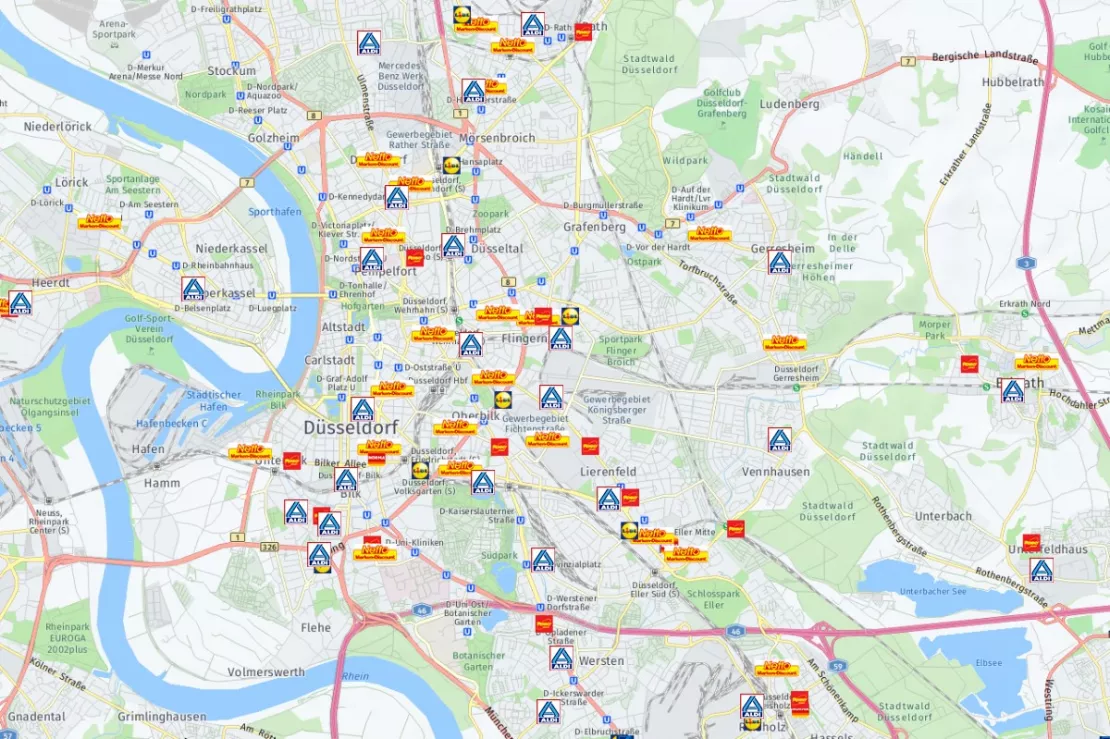
Understand where your competitors are active and how their market presence compares with your own.
Combine your locations, sales teams, customers and competitor locations on a single interactive map.
Visualize complex data with ease – try it for free.
Key features of interactive maps in WIGeoWeb
- Show and hide data layers: Show and hide data layers: Display multiple datasets simultaneously or switch individual layers on and off as needed.
- Choose your own labels: You can label all your data on the map according to your requirements. This allows you to assign a label to each data column, for example, name, region, revenue, number of customers, etc.
- Interactive map-to-table selection: Maps and tables are fully linked. Draw a circle on the map to select a geographic area, and all corresponding records are automatically highlighted in the table.
- Interactive table-to-map selection: When you make a selection in the table, the selected data records are highlighted on the map.
- Changing the scale: Zoom in and out to explore your data at different geographic levels and map scales.
- Interactive printing: You select the area of the map that you wish to print.
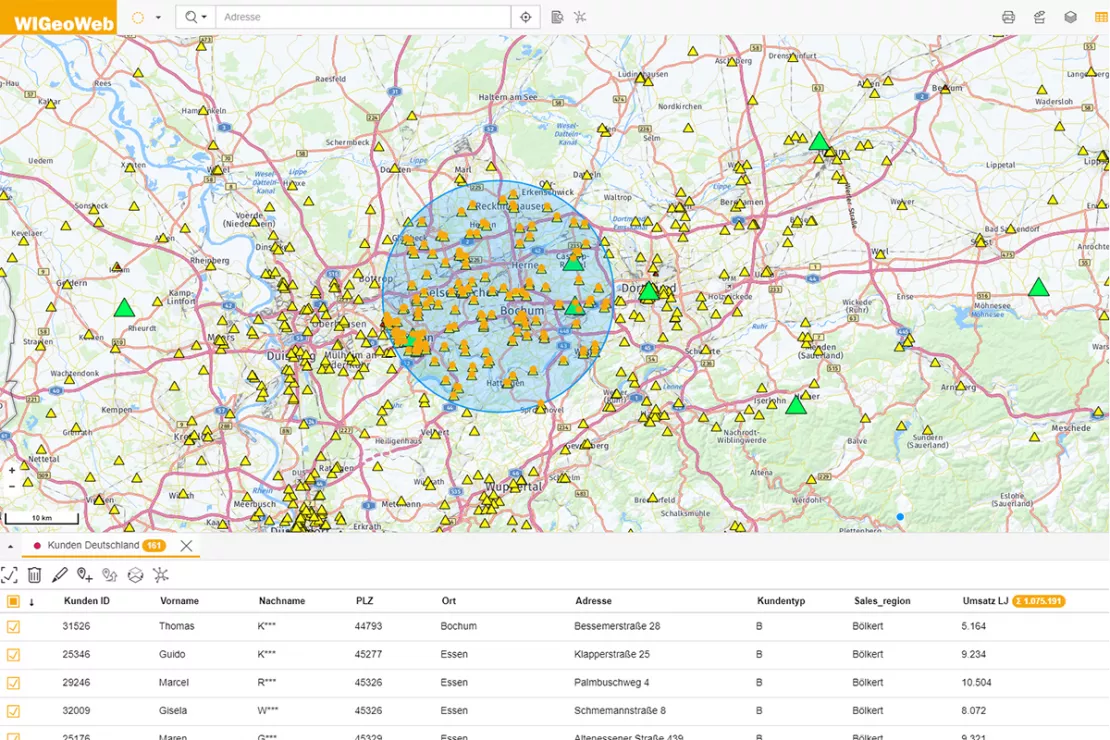
Digital maps offer a wide range of interactive features, allowing you to use the WIGeoWeb WebGIS in an intuitive and engaging way.
Visualize complex data with ease – try it for free.
These Companies Already Use and Trust WIGeoWeb
Take a Look at Our WebGIS Case Studies

Viterma Bathroom Renovation: Sales Territory Planning to Franchise Consulting
Sales forecasts, sales territory planning, franchise consulting: Viterma uses the WIGeoWeb software in a variety of ways across the DACH region.

Austrian Post: Distribution Planning for Advertising Mailings
Distribution planning for advertising mailings: The WIGeoWeb software helps Austrian Post reach their precise target groups.
VDMA - WebGIS supports tractor manufacturers
VDMA Agricultural Machinery uses WebGIS to support tractor manufacturers with geomarketing analyses for the optimization of sales and service structures.
Visualize Your Business Data on a Map. Start for Free Today.
Tutorial: How to Create Interactive Maps Easily with WIGeoWeb
Watch the video tutorial to see how to work with interactive maps in WIGeoWeb and discover the possibilities offered by the WebGIS.
5 reasons to use and create interactive maps with WIGeoWeb
In their personal lives, everyone uses map applications and is aware of their benefits. Businesses, too, benefit enormously from creating interactive maps. Here are the five main reasons:
1. Data visualization
Data can, of course, be presented in charts and graphs. However, a map also reveals another dimension: that of space. This is why you can see more information at a glance on a map. 80 percent of business data is location-based. You take this into account when analyzing data geographically and creating interactive maps.
2. Everything at a Glance with Just a Few Clicks
With interactive maps, you can quickly and easily view your data from any perspective you wish – whether you want to get an overview of your entire area of responsibility or take a very close look at the details.
3. Interacting with data
The map’s interactive features allow you to interact with your data in the best possible way, for example by zooming in and out. View data on business segments, products, regions or market data separately or simultaneously. Cross-reference data. Rotate and flip your data any way you like. The possibilities are virtually endless.
4. Easy and Intuitive to Use
Digital and interactive maps are simple and fun to use. Just one click and you can see the data on the map. Every step can be traced and undone. Analyzing and visualizing data on WebGIS maps is fun.
5. Display Sensitive Data Securely and Privately on Maps
Honestly. Have you ever looked up a customer address or location information with a free map application, despite the risk that others might be able to “read along”? With WIGeoWeb as a WebGIS, you can confidently make maps from all your data, no matter how sensitive it may be. In WIGeoWeb, your data is secure and private.
The Benefits of Interactive Maps
https://www.wigeogis.com/en/market_analysis‘Now I understand!’ – even more than 30 years after WIGeoGIS was founded, we still frequently hear reaction from customers when they see their company data clearly visualized on maps. Why? A study has confirmed that, when carrying out spatial tasks using maps, users:
- make decisions up to 59% faster
- make up to 40% fewer errors
Interactive maps offer significant added value compared to tables and lists, particularly when it comes to location analyses, sales territory planning, white-spot analyses, market potential analyses or the analysis of customer structures.
Create interactive maps – Try it for free now!
- Personal introduction including a trial account
- A free, no-obligation 30-day trial
- The trial ends automatically unless you cancel

* Information about the free trial account: Standard regions with selected data in Germany or Austria will be made available. In Germany, these regions are districts in Munich and environs, and districts of Vienna and environs in Austria. The products of WIGeoGIS are intended for companies and are not suitable for private use. If you need a one-time market analysis, we will gladly make you a service offer.
FAQ
-
What is an interactive map?
Interactive maps are based on digital map data, such as Bing Maps, TomTom or WIGeoStreet. Interactive maps are a core feature of WebGIS software (online GIS). In interactive maps, addresses and other geodata are overlaid with business data and market data and displayed.
Maps in a WebGIS are not static, but interactive. This means that they change when the user makes an input – for example, by selecting specific data to display, making a spatial selection or applying a filter. Furthermore, the map view can be adjusted interactively (zoom in, zoom out).
-
Can I create an interactive map for all of Germany with WIGeoWeb?
Yes! With WIGeoWeb you can create interactive maps for all of Germany and also for every other country, region, city and the entire world.
-
Can I create interactive maps free of charge with WIGeoWeb?
Once you have licensed WIGeoWeb, you can create as many interactive maps as you want for free.
-
Can I create overview maps with WIGeoWeb?
Yes! With WIGeoWeb you can create interactive overview maps of any regions and sections of a map. From micro-locations to municipalities and cities, ZIP Code areas, sales territories, retailer areas, countries, etc. Everything is possible.
-
How can I create interactive maps with WIGeoWeb free of charge?
You require a license to create interactive maps with WIGeoWeb. In WIGeoWeb, users can choose from ready-made interactive maps and view them with different content, data and analyses. As an administrator, you can create new analyses and templates that can be used as interactive maps.
-
Can I use WIGeoWeb to create an interactive map for my website or homepage?
In principle yes, but we have more suitable solutions for this:
- On the one hand you have our “Nextdoor” solution. Nextdoor can serve as a store finder tool on your website. You can also use it to make other places visible on the map, for example sights in your city, restaurants and bars, schools, sports facilities and much more. Your website visitors can use the map interactively.
- On the other hand, you have our WebGIS solution that can be tailored with precisely the information and functions you need for your website. One example of this is the AT Broadband Atlas project.
-
Does WIGeoWeb use Google Maps to create the interactive maps?
If you explicitly want Google Maps for your interactive maps, we can set this up accordingly in WIGeoWeb. However, you must then agree to the Google license models for data usage. WIGeoWeb generally uses other map providers, such as Bing Maps, Here, OpenStreetMap, TomTom etc.
-
Can I create interactive maps from an Excel file?
Yes! You can upload Excel files to WIGeoWeb and use this data in the interactive map for analyses and data visualization. If the data contains addresses, WIGeoWeb automatically geocodes the addresses.
-
Can I create interactive city maps with WIGeoWeb?
Yes, see question 1. With WIGeoWeb you can create any number of interactive maps for any area, including a city.
-
Does WIGeoWeb use the open source GIS QGIS to create interactive maps?
You can make data and analyses that you have created in QGIS available online to a user group of any size via WIGeoWeb. Access rights are controlled through a role management system. WIGeoWeb has an interface for QGIS so that you can easily import data from QGIS into WIGeoWeb at any time. You can also export data from WIGeoWeb into QGIS.
Get started now with no obligation – including a personalised introduction and a free trial account